Palmetto
- 3.1
- Rating
- 10.00K
- Installs
- Free
- Price

 Analysis by App-foxy
Managing home energy can feel surprisingly fragmented. One person checks the utility bill, another looks at the solar equipment, and a third may be trying to understand whether the system is actually helping during the day. Palmetto is designed to bring that monitoring task into one mobile experience. I reviewed it as a House & Home app from Palmetto Solar LLC, and my overall impression is that it is most useful when you already use Palmetto’s solar service and want a simpler way to keep an eye on your home’s energy activity.
The app is free and suitable for everyone, which makes it easy to try without adding another subscription to the household budget. It has been available since July 23, 2020, and the current release is version 5.104.0 for devices running Android 6.0 or newer. Its public reception is mixed rather than outstanding: the average is 3.1 from more than four hundred ratings, with just over one hundred written reviews and over ten thousand installs. I would not treat those figures as a complete verdict, but they do suggest that the experience can depend heavily on a user’s setup and expectations.
From a vague energy question to a daily routine
The starting condition for many users is not a technical problem. It is uncertainty. You may want to know whether your solar installation is producing normally, whether household usage is unusually high, or whether the system is doing anything useful while the family is away. Without a dedicated view, the answer is often buried in a bill that arrives long after the electricity was used.
You May Also Like

 AccuWeather: Weather Radar
AccuWeather Review: A Quick, Clear Forecast for Everyday Decisions
For everyday plans, the best forecast is the one you can understand quickly. AccuWeather makes rain timing, radar, and local conditions easy to act on, with a few trade-offs.

 Hill Climb Racing
Why Hill Climb Racing Still Turns Crashes Into One More Run
A tiny car, a bumpy hill and one more upgrade: Hill Climb Racing keeps resurfacing because its simple chaos makes every near-miss feel personal.

 AliExpress - Shopping App
AliExpress Makes Global Shopping Feel Personal, but Shoppers Bear the Risk
AliExpress turns a global marketplace into a pocket-sized discovery engine. Its reach is useful, its shopping loop compelling, and its trade-offs easy to miss.

 Lords Mobile: Kingdom Wars
Lords Mobile Is a Kingdom-Building Routine, Not a Quick Match
A case-by-case verdict on the building, battles, device demands, and social commitments that make Lords Mobile rewarding for some players and exhausting for others.

 PDF Scanner app - TapScanner
TapScanner Makes Paperwork Easier to Capture, Check, and Share
TapScanner makes scanning with a phone feel less like a rescue operation and more like a dependable step in getting work done. Its capture tools are useful, though not flawless.

 Block Blast!
 Shows How Much a Puzzle Game Can Leave Out
A quiet grid game shows why puzzle players increasingly value instant clarity, repeatable skill and low-pressure play—and where the genre still needs to catch up.
More From Our News Desk
View All News


That is where Palmetto makes sense. Rather than treating energy as a once-a-month expense, I found the app better suited to a quick check-in habit. Open it when you are curious, look at the available home-energy information, and use that view to decide whether further action is needed. It is not a replacement for understanding your utility bill, but it can make the day-to-day side of solar ownership feel less distant.
The most important practical point is that Palmetto works best as a monitoring companion, not as a universal energy-control center. If you are already connected to Palmetto’s ecosystem, the app has a clear purpose. If you are simply looking for a general electricity tracker that can read any meter or appliance, I would be more cautious. The value comes from the relationship between your home and Palmetto’s service, not from the app name alone.
What I would prepare before opening it
Before relying on any energy app, I think it helps to clarify the question you want answered. Are you checking whether solar production is visible? Are you trying to understand consumption patterns? Are you hoping to spot a problem quickly? Those are related goals, but they are not identical, and the app is easier to judge when you know which one matters most.
I would also make sure the account and home setup are ready before expecting useful information. A monitoring screen can only be as helpful as the connection behind it. If the relevant service is not associated with your account, or if the system has not finished updating, an empty or incomplete view can feel like an app failure even when the real issue is setup.
This is one of the less obvious trade-offs. Palmetto is convenient precisely because it is tied to a particular solar-service workflow. That specialization can make the experience more focused than a collection of unrelated utility tools, but it also means the app is not equally useful to every homeowner. Renters, people without Palmetto equipment, and users who want a broad smart-home dashboard may find the fit limited.
The first pass through the app
My preferred approach is to treat the first session as an orientation rather than a test of performance. I would open the app, identify the home or energy view, and look for the information that answers the original question. The goal is not to stare at every available figure. It is to learn what the app considers important and how quickly I can reach that information on a normal day.
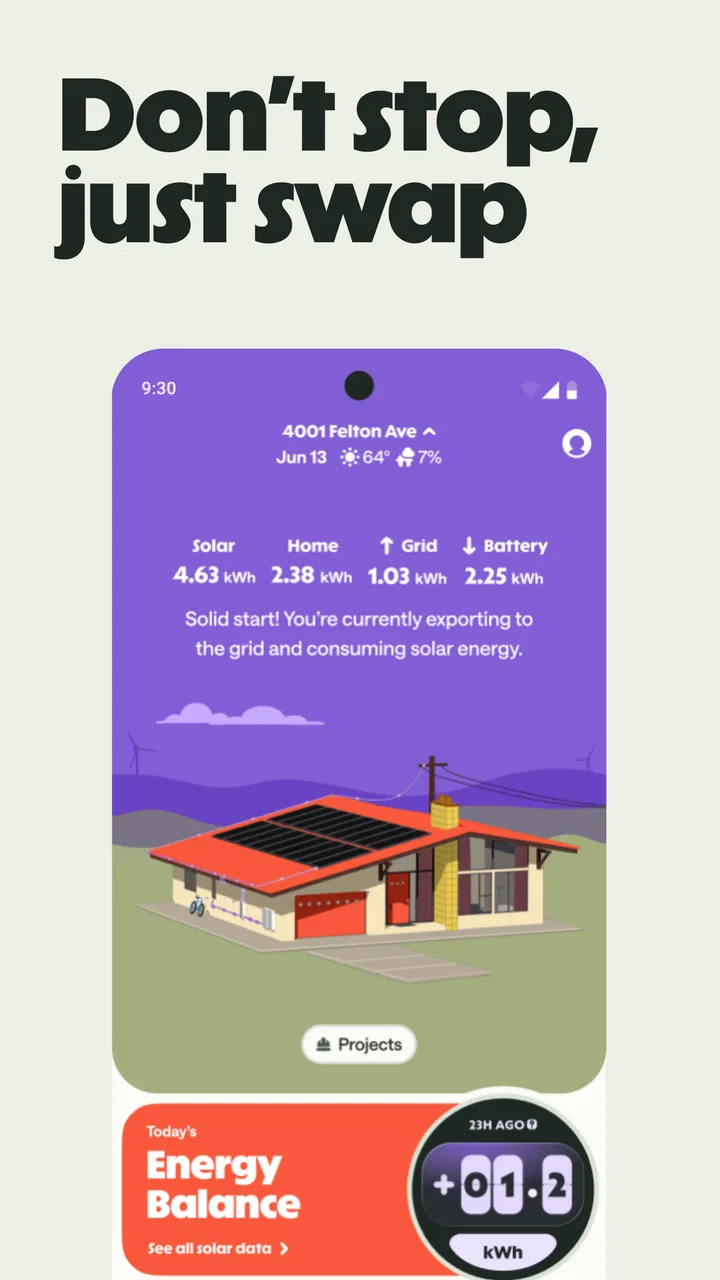
For a homeowner, the useful workflow is straightforward in principle: open Palmetto, review the current energy picture, compare it with what the household is doing, and decide whether the result looks ordinary. On a bright day, that might mean checking whether production appears consistent with expectations. In the evening, it might mean reviewing the home’s activity after solar generation has ended. The app becomes more valuable when these checks are connected to real decisions rather than treated as a novelty.
I would not use a single glance to make a serious conclusion about system health. Weather, time of day, household behavior, and the timing of the available information can all affect what appears on screen. A better habit is to notice repeated patterns and then contact the appropriate support channel if something remains unusual. Palmetto can help you notice a question; it should not encourage you to diagnose electrical equipment from a phone display.
A realistic household example
Imagine leaving home for work and returning in the late afternoon. Before dinner, you open the app because the house has been empty and you want to see whether the day looked normal. You review the energy view, then remember that a large appliance ran earlier than usual. That context matters: a different household load can explain a result that might otherwise seem strange.
Later, you check again after everyone is home. The second look gives you a more useful comparison than the first because the household conditions have changed. Perhaps the family cooked, used entertainment devices, and charged phones. The app does not need to turn that moment into a technical investigation. Its practical role is to give you a shared reference point for discussing what happened in the home.
This workflow also helps avoid a common mistake: judging solar performance only by the utility bill. The bill is important, but it is a delayed financial summary. Palmetto is more suitable for the immediate question of what is happening around the home. I see the two tools as complementary rather than interchangeable.
Where the handoffs happen
Energy monitoring involves several handoffs, and the app sits in the middle of them. Information has to move from the home’s energy system into Palmetto’s service, then into the mobile interface, and finally into your own decision-making. A delay or mismatch at any point can make the experience feel less dependable than a simple dashboard suggests.
The first handoff is from the equipment or service connection to the account. This is the part users often experience indirectly. If the home is not correctly associated with the account, the app cannot become a useful window into that property. For that reason, I would keep account details organized and avoid assuming that installing the app alone completes the whole process.
The next handoff is from the service to the screen. Here, the main question is whether the information is clear enough to interpret without specialist knowledge. A good monitoring experience should help a homeowner distinguish between normal variation and something worth investigating. When the display is not immediately understandable, the app’s convenience drops because the user has to reconstruct the meaning from outside sources.
The final handoff is from the homeowner to support or service staff. If the app shows something unexpected, you may need to explain what you saw, when you saw it, and what the home was doing at the time. That is why I recommend noting the context rather than sending a vague complaint. A short record such as “the home was empty, the weather changed, and the display looked different after returning” is more useful than simply saying that the numbers seemed wrong.
In this respect, Palmetto can serve as a conversation starter with the people responsible for the installation or service. It does not eliminate those handoffs. Instead, it can give both sides a shared reference point, provided the information is visible and the user understands what it represents.
Turning monitoring into useful behavior
The strongest use case I found is building awareness without becoming obsessive. I would check the app at consistent moments rather than repeatedly refreshing it. For example, a morning glance can establish whether the home is starting the day normally, while an evening review can provide a broader sense of how the household behaved. Consistency is more informative than random checking.
A second useful workflow is to compare the app with changes in the home. If you add a new appliance, alter your schedule, or begin working from home, pay attention to how the energy picture changes over several ordinary days. This does not turn Palmetto into a laboratory instrument, but it can help connect household habits with energy use in a way that a monthly bill rarely does.
A third insight is to use the app before contacting support, not after frustration has already built up. If something looks unusual, check whether the same pattern appears again under similar conditions. Record the approximate time and what the household was doing. That small preparation can make the handoff to support more efficient and can prevent a one-off observation from becoming an unnecessary service request.
There is also a family benefit. One person often becomes the unofficial energy manager, while everyone else only sees the bill. A shared monitoring app can make the subject more concrete. Children can understand that turning devices on and off affects the home, and adults can discuss energy behavior without relying solely on an abstract monthly charge. I would still keep the explanations simple; the purpose is awareness, not turning the household into a control room.
What happens when the result is useful
The result Palmetto can deliver is not necessarily a dramatic saving or a perfectly optimized home. The more realistic outcome is confidence. You can develop a clearer sense of whether the home’s energy activity follows the household routine and whether a change deserves attention.
That confidence is especially helpful for people who have invested in solar but do not want to become equipment specialists. The app gives the system a more visible presence in everyday life. Instead of waiting for a bill or wondering whether the installation is doing anything, you have a place to begin checking.
Still, I would keep expectations grounded. Monitoring is not the same as reducing consumption. The app may show you a pattern, but the actual improvement comes from what you do with that knowledge: shifting habits, investigating unusual behavior, or asking the service team a better question. Users looking for automatic home-energy optimization may prefer a broader smart-home platform with direct device controls, assuming their equipment supports those functions.
Palmetto is also not the best choice for someone who wants a complete financial analysis. A utility bill remains the authority for charges, credits, and billing periods. The app’s strength is the home-energy view, while the bill explains the final financial consequence. Using one as a substitute for the other can create confusion.
Where the flow breaks down
The biggest weakness is the possibility of friction between what the homeowner expects and what the app can actually show. The short store description is simply “Palmetto,” while the broader purpose is monitoring home energy. That leaves room for new users to expect a much wider set of tools than the app’s focused role may provide.
Mixed user feedback reinforces that caution. An average of 3.1 indicates that the experience has not been consistently smooth for everyone. I would not assume that a disappointing session automatically means the service is unusable, but I would take it as a reason to test the app against your specific setup before making it central to your routine.
Another break occurs when users expect real-time precision from a monitoring view. Energy systems and reporting services do not always present information in the same way, and a screen can be accurate for its intended purpose while still feeling delayed or incomplete to someone watching minute by minute. If you need professional-grade diagnostics, the app should be one source of context rather than your only instrument.
There is also a human failure point: interpretation. A lower-looking result can be caused by ordinary conditions, and a normal-looking result does not prove that every component is perfect. I appreciate Palmetto more when I treat it as a way to notice patterns, not as a guarantee that the home has been fully inspected.
For troubleshooting, I would follow a calm sequence. First, confirm that the home and account are the ones you intended to view. Next, consider the time of day and what the household was doing. Then check whether the unusual result repeats. If it does, capture the relevant context and pass it to the service team. This approach avoids both extremes: ignoring a genuine issue and escalating every temporary variation.
Who should install it
I would recommend Palmetto to a homeowner already using Palmetto’s solar service who wants a convenient way to stay connected to home-energy activity. It is particularly suitable for people who prefer quick visual checks over spreadsheets and who want to understand their system without studying technical documentation.
It can also suit households where responsibility is shared. A partner who did not arrange the installation can still use the app to follow what is happening. That makes energy management less dependent on the one person who handled the original purchase or setup.
I would be more hesitant if you are looking for a device-agnostic energy monitor, detailed appliance-level analysis, or direct control over a wide range of smart-home equipment. In those cases, a general energy-monitoring platform or a utility-specific application may be a better match. The right alternative depends on whether your priority is solar visibility, billing, appliance detail, or automation.
People who dislike checking dashboards may also gain little from it. Palmetto does not turn awareness into action by itself. If you will open it only once and never use what you learn, the app is unlikely to change your household’s energy habits. Its benefit grows through a modest, repeatable routine.
My final view after following the workflow
Palmetto is a focused House & Home app with a sensible role: helping connected homeowners monitor their home’s energy rather than leaving solar performance hidden behind equipment and monthly bills. I like the idea of using it as a bridge between everyday household behavior and the service team responsible for the system.
My recommendation comes with an important condition. I would choose it when the Palmetto connection is already part of your home setup and your goal is practical visibility. I would not choose it as a universal replacement for a utility bill, a professional diagnostic tool, or a full smart-home controller. Those are different jobs.
Because the app is free and rated for everyone, trying it is relatively low-risk for an eligible household. Just give the first session a clear purpose, learn what the displayed information means, and judge it over repeated real-world checks rather than one moment. If the handoffs from home system to account to screen work smoothly, Palmetto can become a useful part of the household routine. If those handoffs remain confusing or the information does not match your needs, a broader monitoring alternative may serve you better.
In my experience, the app’s real value is not flashy control. It is the small improvement in visibility that helps you ask better questions and make more informed choices about your home. For Palmetto users who want that kind of connection, it is worth considering; for everyone else, the specialized nature of the service is the main reason to look elsewhere.
FAQs for Palmetto
01What is Palmetto, and what does it offer?
Palmetto is a versatile app designed to streamline your daily activities by offering features such as task management, calendar integration, and reminders. It aims to enhance productivity by allowing users to organize their schedule efficiently. With a user-friendly interface, Palmetto provides tools for setting goals and tracking progress, making it a comprehensive solution for personal and professional productivity.
02Is Palmetto available on both Android and iOS platforms?
Yes, Palmetto is available for both Android and iOS devices. It can be downloaded from the Google Play Store for Android users and the Apple App Store for iOS users. The app is optimized for smooth performance on both platforms, ensuring a consistent user experience regardless of the device you use.
03Does Palmetto require an internet connection to function?
Palmetto offers both online and offline functionalities. While many features are accessible offline, an internet connection is required for syncing data across devices and for calendar integration. Users can still access their tasks and basic features without connectivity, but full functionality is best experienced with an active internet connection.
04Is there a cost associated with using Palmetto?
Palmetto offers a free version with essential features for basic task management. However, there is also a premium subscription available that unlocks additional features such as advanced analytics, customizable themes, and priority support. Users can choose the plan that best suits their needs and budget.
05How secure is my data on Palmetto?
Palmetto prioritizes user privacy and data security. The app employs encryption to protect user data, ensuring that information remains confidential and secure. Regular updates are made to enhance security measures, and users can access privacy settings to manage data sharing preferences. Palmetto is committed to maintaining a safe environment for its users.
Pros
- User-friendly interface with intuitive navigation.
- Offers a wide variety of customizable tools.
- Seamless integration with other platforms.
- Excellent customer support and response time.
- Regular updates with new features and improvements.
Cons
- Some features require in-app purchases.
- Occasional bugs can disrupt user experience.
- Limited offline functionality available.
- High data consumption for some features.
- Initial setup can be time-consuming.

Palmetto
Gallery